Online Banking Navigation

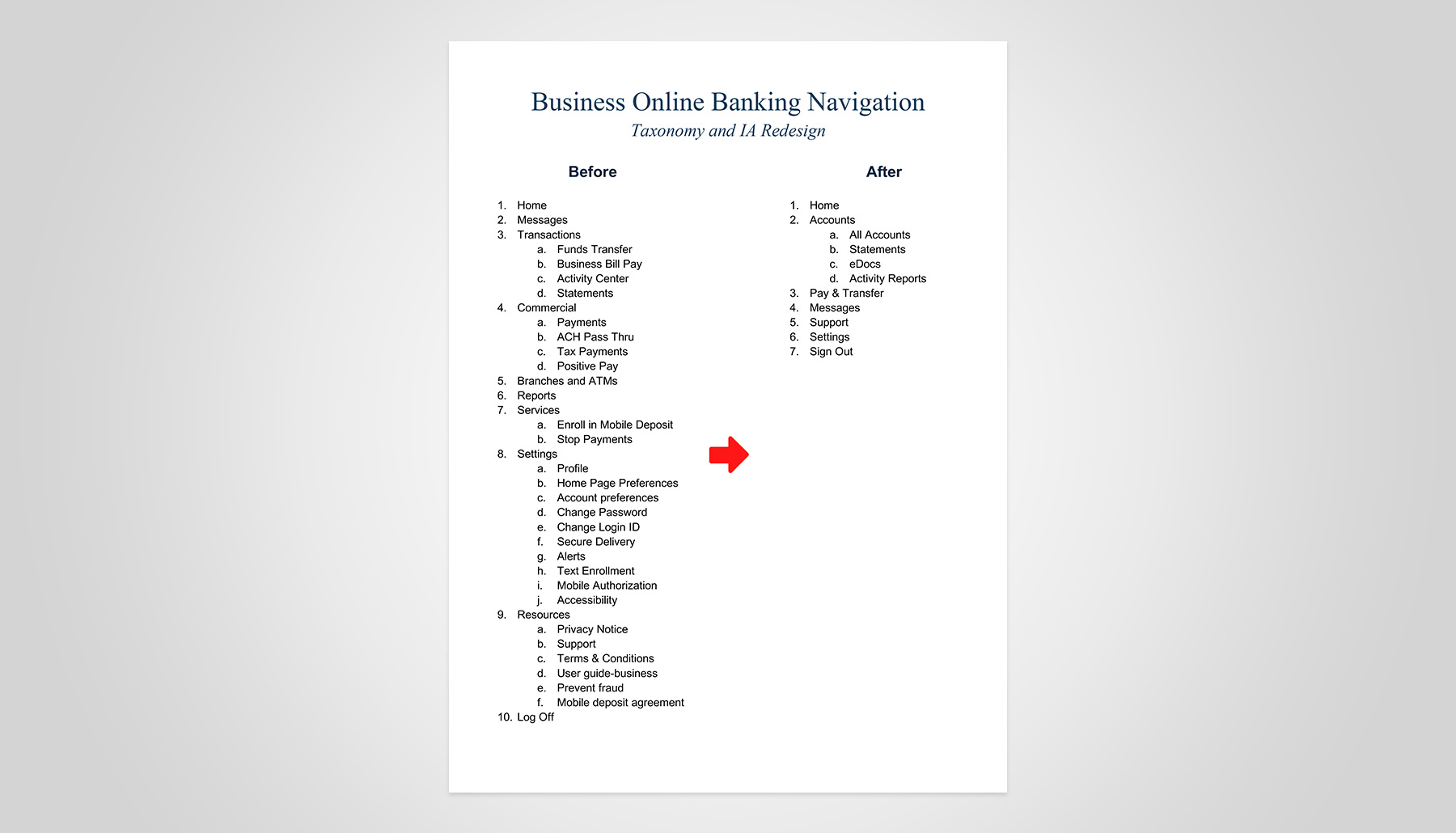
Valley’s Business Online Banking platform targets small- to mid-market business clients and enables comprehensive management of daily financial operations, including payments, wires, fraud protection, and user administration. Prior to these enhancements, the platform used a vertically oriented navigation system, leading to deep menu nesting, inconsistent terminology, and misalignment with customer expectations.

Role: Director, Experience Design. Responsible for developing and executing the navigation strategy, overseeing research, and validating deliverables—defining the information architecture vision and ensuring actionable, evidence-based design recommendations.

Partners: Product (Business Banking)/Q2 Platform Admins (Internal) · Platform Enablement Vendor

Team Deliverables: Competitive Navigation Analysis · Low-fidelity Prototype · UX Research Brief & Analysis · Usability Testing · Final Validated Nav Prototype + Content

Tools: Axure RP · UserTesting · Maze · Grammarly · Miro

Timeframe: Ongoing

The Problem

Valley is migrating to a next-generation Q2-powered business banking platform, aiming to complete full implementation by year-end 2026. A mandated platform upgrade for Q3 2025 required a strategic shift from vertical to horizontal navigation, driving a compressed timeline for critical navigation redesign ahead of migration.
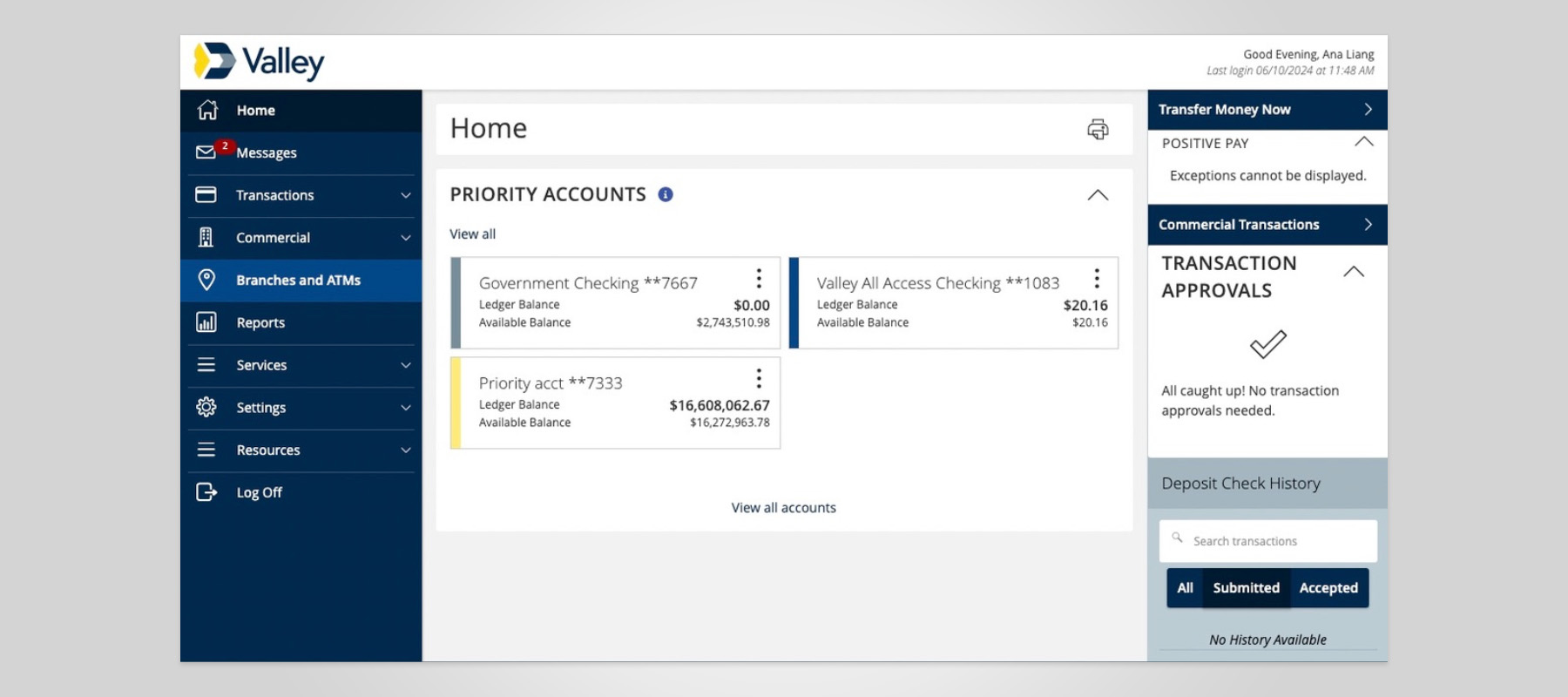
The current platform has user pain points:

  • Navigation, Self-Help, and Wayfinding Challenges: Business customers reported frequent confusion locating critical, high-frequency tasks such as initiating treasury services, managing users, and finding transaction history. This often led to frustration and disrupted workflows.
  • Customer Care Volume: Analytics and customer care records showed that many customers abandoned tasks midway, suggesting that navigation difficulties directly contributed to increased calls for assistance.
  • Platform Constraints: The design uses a vertical navigation menu, but Q2’s platform only supports a single-row, horizontal navigation with dropdown menus. This mismatch limits flexibility and complicates access to key features.

Opportunity

  • Drive Clarity in Navigation Structure: Implement a user-aligned taxonomy that conforms with industry benchmarks, groups features for rapid access, and reduces cognitive complexity in the user journey.
  • Enable Self-help: Accelerate discoverability of the top 10% most-used features, optimize self-help resources and wayfinding, and strengthen onboarding and role-based navigation.
  • Continuous Improvement & Feedback: Drive improvement through direct feedback and ongoing prototype testing.

Process

Research & Discovery

As a starting point, the Experience Design team conducted a short-term study to identify industry-standard trends and guide us toward a direction for usability testing.

Competitive Analysis

A comparative navigation audit was conducted across leading and competing US banks, including:

  1. Chase
  2. Citi
  3. Bank of America
  4. Capital One
  5. SoFi
  6. U.S. Bank
  7. Truist
Key Competitive Insights

Across competitors, we observed strong consistency in:

  • Task-based language (“Pay & Transfer” vs. “Payments Hub”).
  • Surface-level visibility of fraud and user management.
  • Grouping features by customer intent, not internal systems.

Card Sort & Tree Testing

Applying industry patterns, we developed a new taxonomy that guided two card-sorting rounds and a tree-test using a low-fidelity prototype.

Our general population test subjects were business owners.
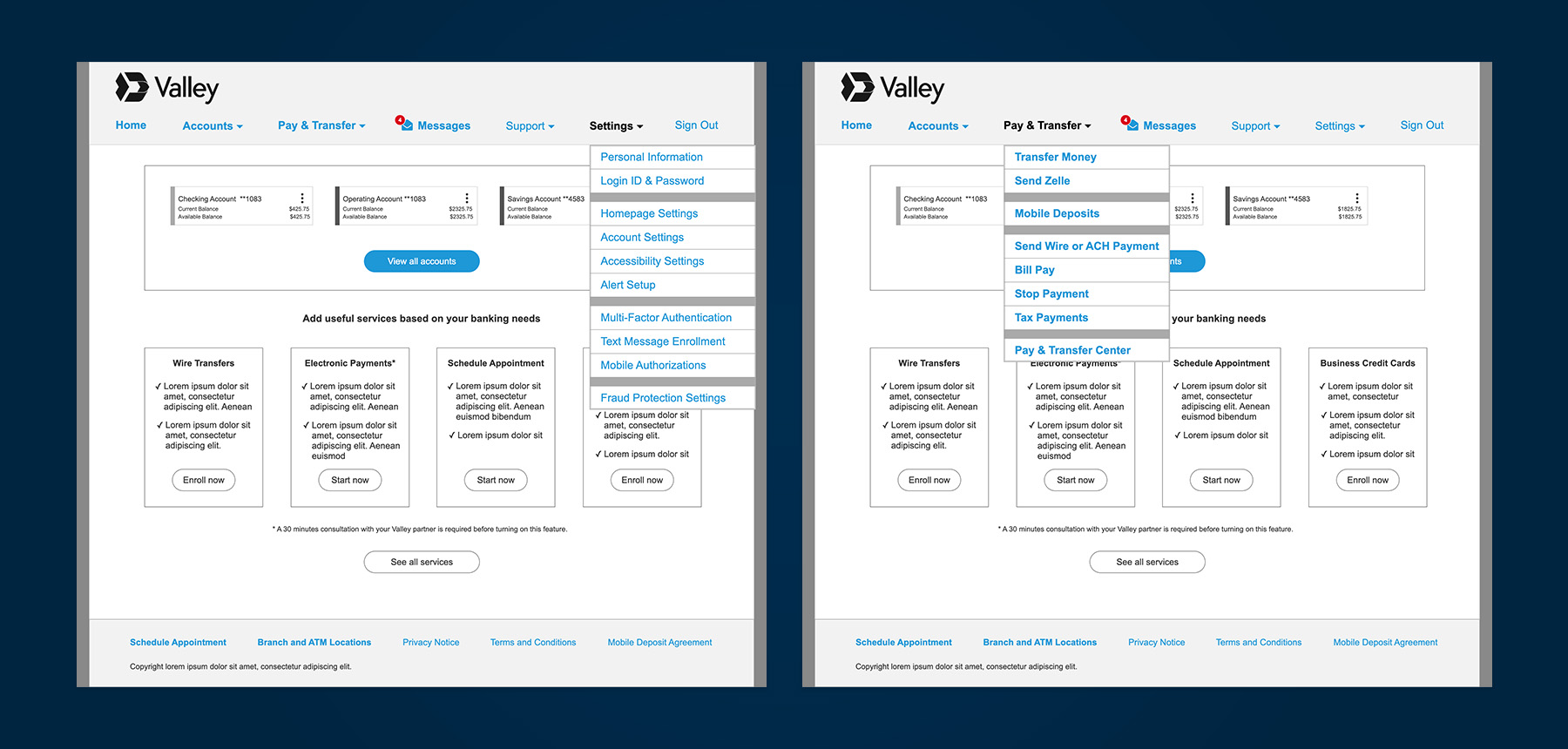
Findings
  • Strong clustering around payments, accounts, and settings.
  • Confusion between “Payments Hub” and transaction history.
  • Fraud services terminology lacked clarity.

Test artifacts are unavailable, but insights informed how my team approached the next prototype iteration.

View the testing prototype >

In parallel, I oversaw the creation of high-fidelity mockups that illustrated our vision for an optimized digital banking experience. These artifacts provided Q2 and stakeholders with a clear blueprint for investment and cross-functional engagement in customer-centric transformation.

No items found.

Define

No items found.

Ideate

No items found.

Branding

No items found.

UX Design

Hidden Role Discovery

As we worked with Q2, our Product team discovered previously unknown features and role-based navigation items in the vendor’s admin panel. We also learned about Q2’s customizable landing pages, which serve as category hubs rather than forcing users to navigate long menus.

Taking a new approach, my team incorporated these new nav items and landing page concepts, hypothesizing that they would:
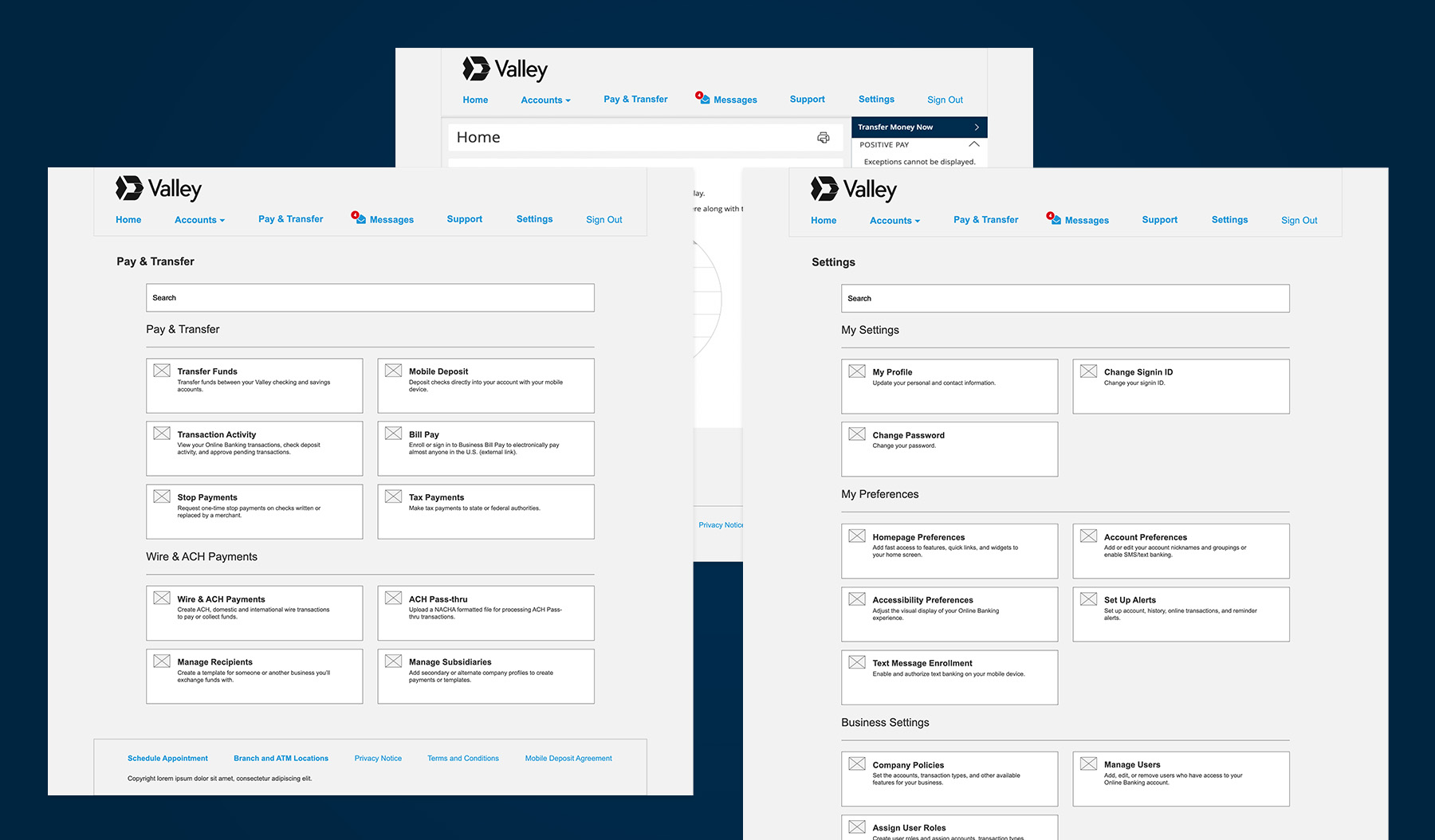
  • Improve visibility of high-value features.
  • Reduce the number of top-level navigation items and eliminate excessive scrolling caused by deep nesting in navigation menus.
  • Grouped features by primary business intent to improve scannability.
  • Provide on-screen content to help guide users through the experience.

The next prototype iteration intentionally focused on structure and labeling, not visual polish, to ensure future research addressed IA.

No items found.

Visual Design

No items found.

Testing

Phase 2 Usability Testing

Our Product gained access to Q2’s admin panel, revealing additional navigation items tied to specific user roles that were not included in earlier prototypes. Thus, my team had to incorporate these additional features into the navigation structure.

Our test subjects included the general population and Valley small business owners with varying abilities, including power users. We will examine the outcomes of three specific user tasks.

Phase 2 Test Results

The general population group generally outperformed Valley customers in task success. Our hypothesis was that the general population has broader banking experience and higher business revenue, thus using more business banking services.

Assign User Roles
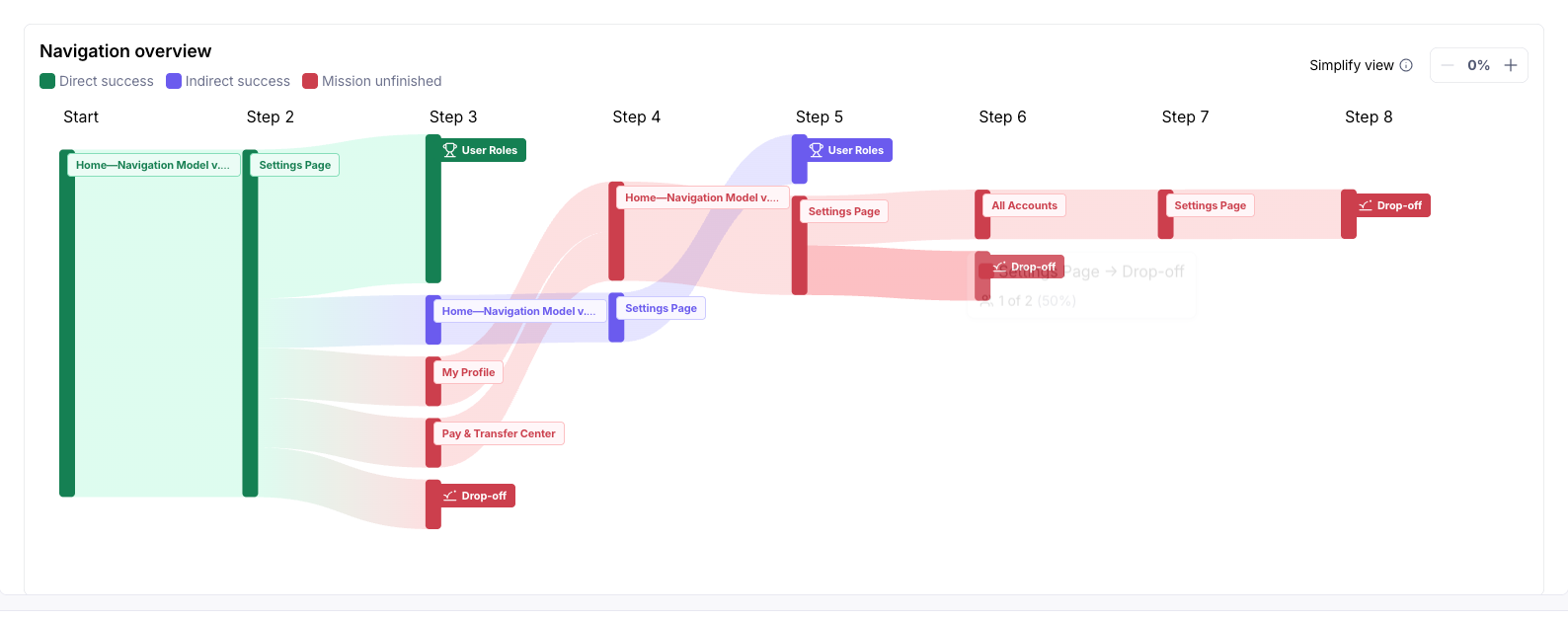
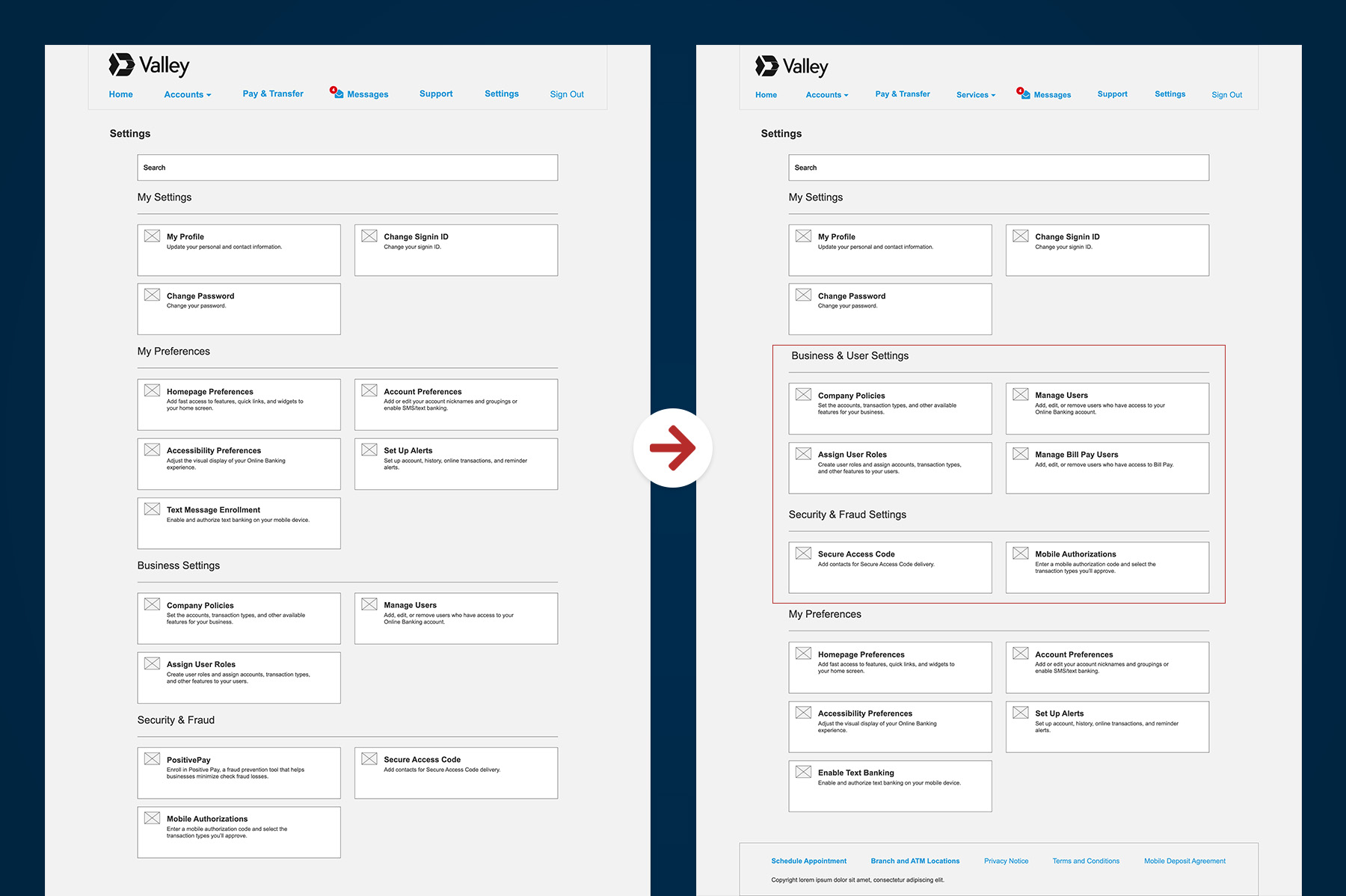
  1. Insight: All Valley customers first clicked Settings, but only 3 succeeded in finding where to assign user roles. The other ended up in All Accounts or Pay & Transfer.
  2. Recommendations
    1. Assign User Roles belongs in Settings, but position the tile more prominently.
    2. Reorganize Settings to surface critical business controls.
P1: “Under settings, then Profile, the user Roles should be more easily identifiable.”

View Wire Payment Status
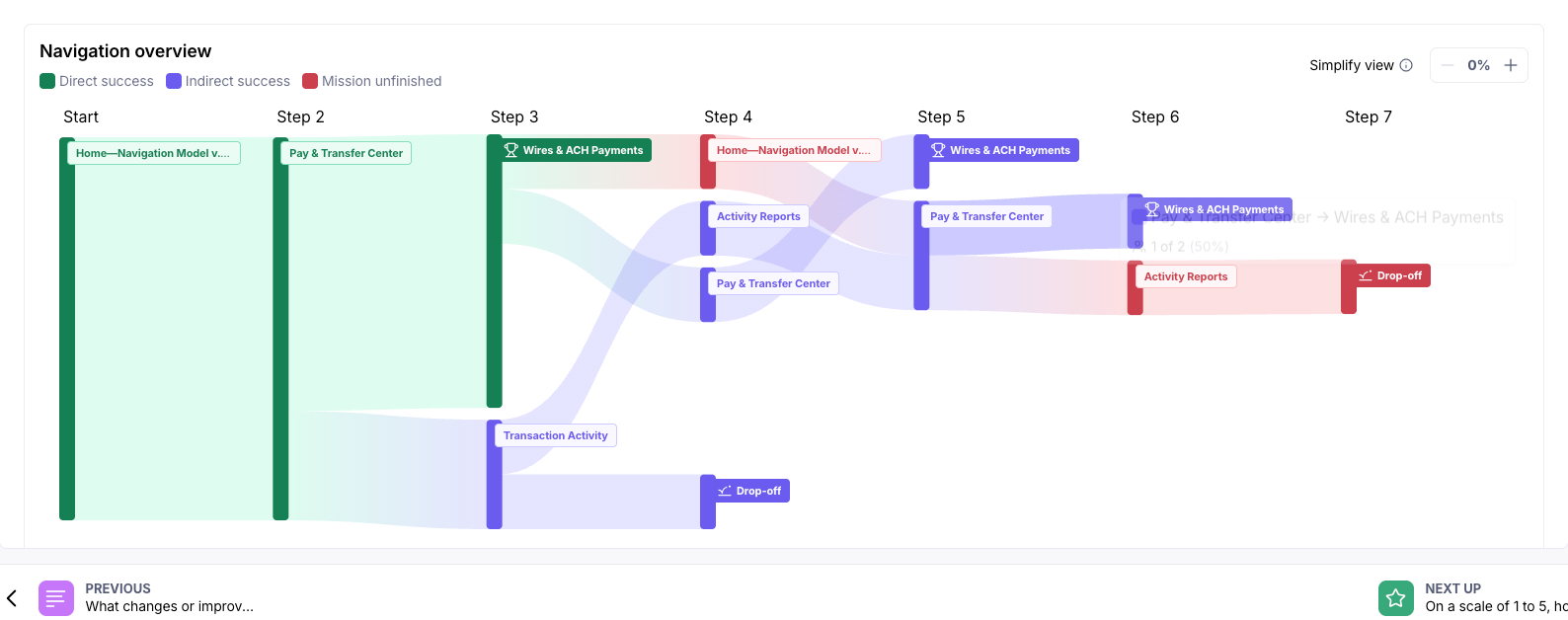
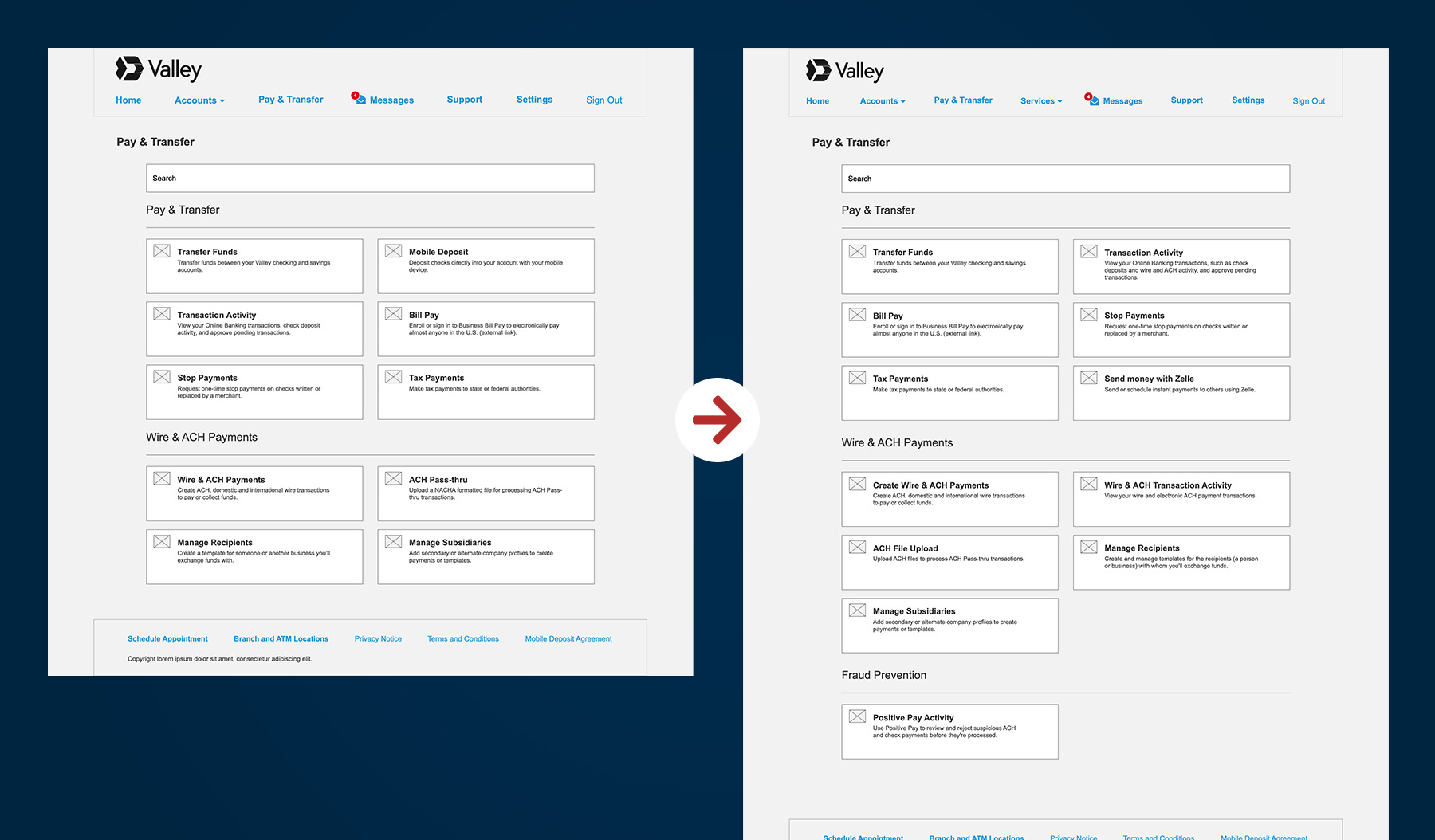
  1. Insight: Most testers in both groups chose Wire & ACH Payments over Transaction Activity. Some esoteric terms, like ACH pass-thru, were confusing.
  2. Recommendations
    1. Rename Payments Hub to Create Wire & ACH Payments.
    2. Clarify the difference between transaction activity and payment creation by adding  “wire and ACH payments” to the Transaction Activity tile description on Pay & Transfer.
    3. Duplicate the Transaction Activity tile under Wire & ACH Payments on Pay & Transfer.

Positive Pay

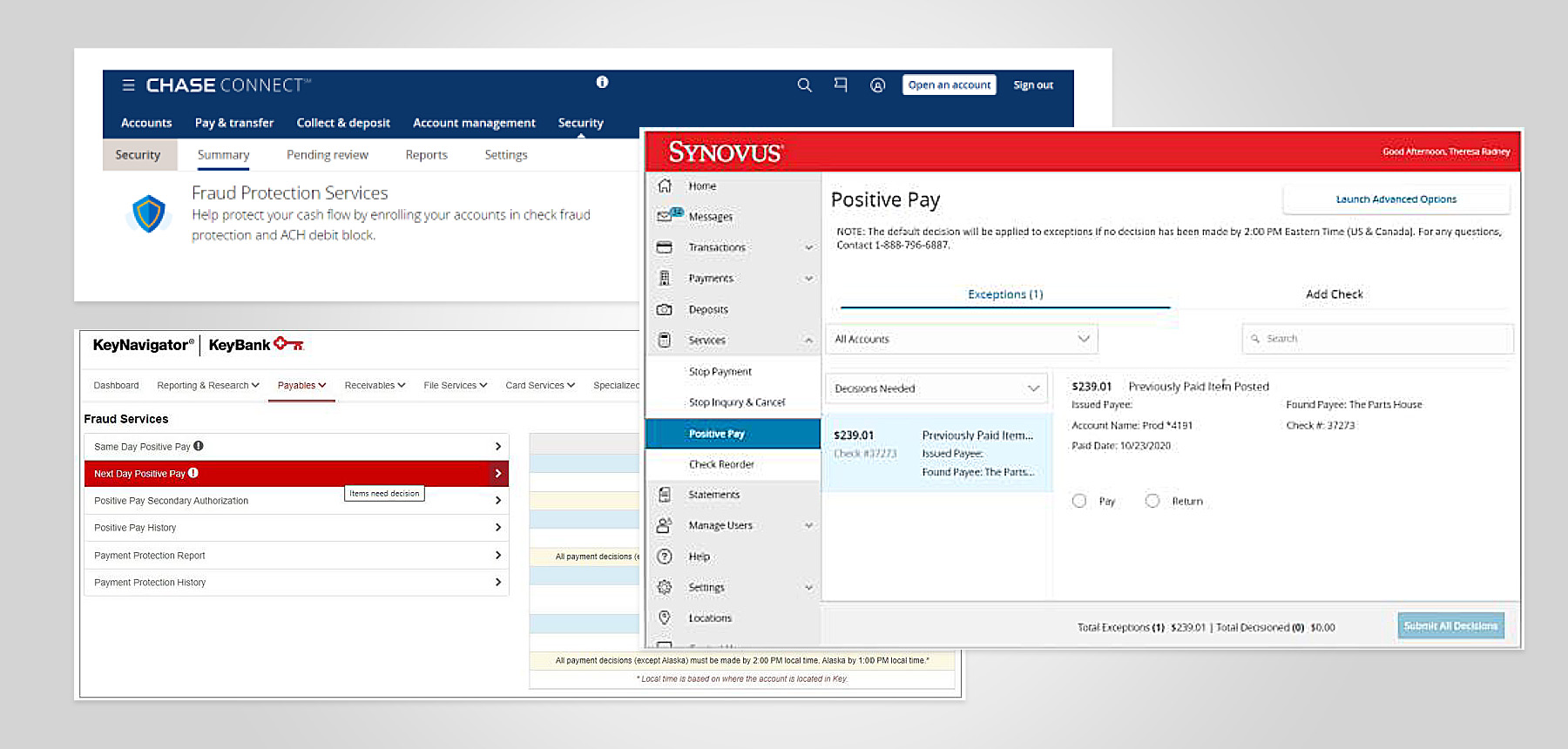
  1. Insight: Valley customers struggled the most to locate Positive Pay, thinking it was in Settings or Pay & Transfer. Both test groups knew Positive Pay was a service (not a setting), but didn’t know to go to Settings to find it.
  2. Recommendations
    1. : Move Positive Pay to Pay & Transfer under a new Fraud Services section.
    2. Conduct further research to determine how other institutions label fraud-prevention services.

P4: “Maybe there should be a separate tab for fraud alerts.”
Phase 3 Usability Testing

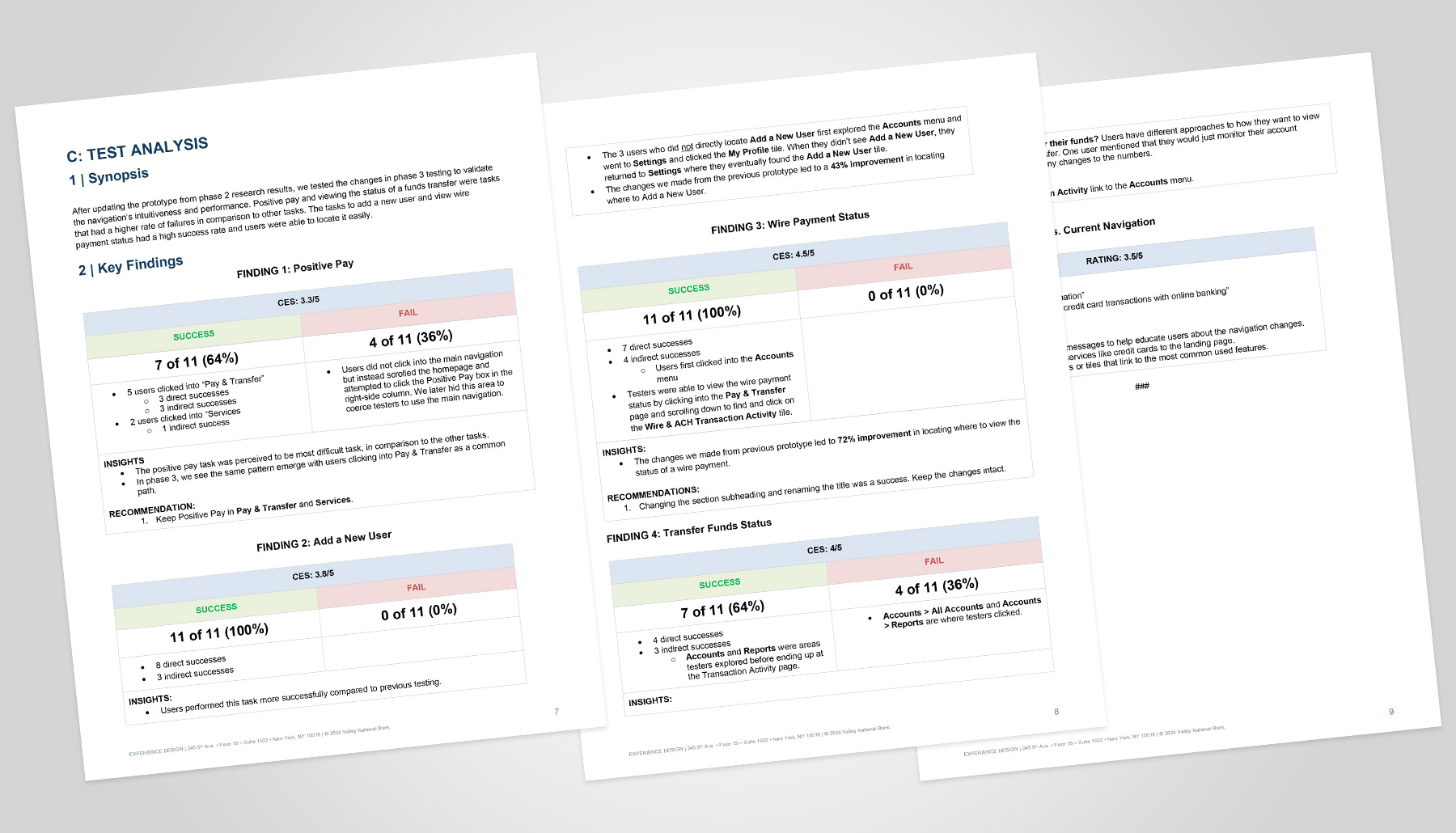
After updating the prototype based on Phase 2 research results, we tested the changes in Phase 3 to validate the navigation’s intuitiveness and performance.

[Report Screenshot]

Phase 3 Test Results

Assign User Roles

  1. Insight: Prototype changes achieved a 100% success rate, a 43% improvement in successful task completion. Moving the Business & User Settings higher up on the screen was impactful.

View Wire Payment Status

  1. Insight: Prototype changes achieved a 100% success rate, a 72% improvement in successful task completion. Rewording the page section and tile title was successful.

Positive Pay

  1. Insight: Although the task achieved a 64% success rate, both test groups perceived finding Positive Pay to be the most difficult task. We saw the same friction pattern emerge with tests clicking Pay & Transfer.  
  2. Recommendations
    1. Keep Positive Pay in Pay & Transfer and Services.
No items found.

Impact

Outcomes

  • Significantly improved discoverability of high-value features.
  • Reduced cognitive load in navigation decision-making.
  • Clearer alignment with industry standards.
  • Established a validated IA model ready for Q2 migration.

Learnings & Reflections

  • Collaboration Fuels Progress: Despite evolving requirements, tight timelines, and process challenges, cross-functional alignment and strong partnerships proved essential in advancing the program and achieving sound, informed decisions.
  • Strategic Prioritization Delivers Value: With finite resources, we targeted the most impactful use cases, balancing customer needs, vendor constraints, and delivery deadlines to maximize executive ROI.
  • Start with Proven Signals, Then Validate: Competitor patterns, customer feedback, and industry conventions provided a strong starting point, allowing the team to form hypotheses quickly and refine them through research.

Next Steps

  • Phased Navigation Rollout: Gradually introduce select top-level navigation changes ahead of the Q2 migration to help customers adjust with minimal disruption.
  • Full Launch Post-Migration: Roll out redesigned landing pages and the finalized taxonomy after the Q2 migration to deliver a cohesive end-state experience.